
RoofGo Instant Estimate
Your own instant roof estimate, on your link.
Homeowners who are curious about a new roof type their address and see a preliminary price from your Price Book, with no sales call. You get their name, phone, email and address, saved straight into RoofGo.
Included in every plan. The demo is a fictional company on sample houses: nothing is measured, saved or sent.
Your preliminary estimate
214 Magnolia Ln, Your Town, US
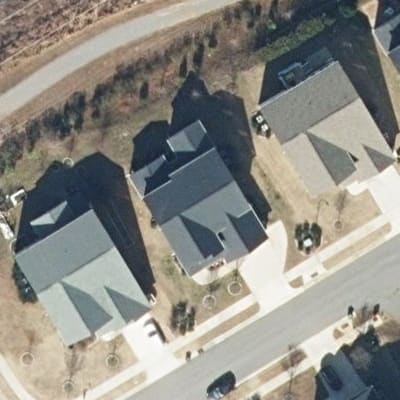
Estimated price
$18,900
About 39 squares · 6:12 · Architectural shingle
Book a free inspection
Download PDF
This is a preliminary estimate, not a bid or a final price.
See it in action
A homeowner opens your link, picks their address, leaves their details and gets your price and your proposal. The lead lands in Estimates with its campaign and rep, and Analytics shows which campaign brought it in.

Real RoofGo screens with a fictional demo company and homeowner. Address lookup and roof measurement were simulated for the recording. Sequence shortened.
A lead machine that runs while you are on a roof
Homeowners want a number first
Plenty of people are curious what a new roof costs long before they want a sales visit. Give them a price on their phone in a few taps, with no call and no appointment.
You get a real lead
Name, phone, email and address are required before the price shows, and every one is checked. Each lead saves straight into Estimates with the price they saw.
It is your proposal
The homeowner sees the same branded proposal and PDF your reps send: your logo, your Price Book, your terms and your next step.
What the homeowner does
- 1
Open your link
From your website, a text, an ad or a QR code.
- 2
Enter the address
Pick it from the list and confirm it is their house.
- 3
Two quick questions
Stories (and roof type, if you offer more than one), then name, email and phone.
- 4
See the estimate
A preliminary price from your Price Book, a PDF, and your booking or call button.
Every result says it is a preliminary estimate from aerial imagery, not a bid or a final price, and lists your assumptions. Roofs that cannot be measured, and addresses outside your area, become quote requests you follow up.
Put your link everywhere
One estimator, as many campaigns as you like. Every link and QR code is tracked by campaign, and printed codes keep working.
Your website
A "Get an Instant Roof Estimate" button, or the estimator embedded in a page.
Your Google Business Profile
Add the link as your website or booking link, and in your posts.
Facebook and Instagram
In posts, your bio, ads and replies to anyone who asks for a price.
Business cards
A QR code on each rep's card, with leads going to that rep.
Door hangers
For the doors where nobody answered.
Yard signs
On every job, so the neighbors can price their own roof.
Truck wraps
A QR code people can scan in the driveway or the parking lot.
Mailers and flyers
RoofGo's letter-size mailer already carries a QR code to each homeowner's estimate. Add the campaign's code to your own flyers too.
A QR code per campaign
Each campaign gets its own link and code, so you see which one brings in leads.
Email signatures
Every email your team sends becomes a way in.
Text replies
Someone texts asking what a roof costs? Reply with your link.
What you get
A hosted link, no login
Your page on your link, with your logo and colors. Share it in texts, posts, ads and your Google profile. Nothing to install.
A website button in minutes
Copy the button code ("Get an Instant Roof Estimate") into your site, or embed the estimator in a page. No developer needed.
QR codes for every campaign
Door hangers, yard signs, truck wraps and each rep's cards get their own code, PNG, SVG or print-ready PDF. Printed codes keep working.
Leads saved in RoofGo
Every estimate and quote request lands in Estimates with its source, campaign and rep, ready to claim, assign, send or mail.
Campaign analytics
Visits, starts, estimates, quote requests and booking taps by campaign and rep, with date filters and CSV export.
CRM webhooks
New leads and estimates go to Zapier, Make, n8n or your CRM, signed, retried and logged.
Leads for a few credits each
A priced estimate uses 3 Property Credits from your plan: $0.60 to $2.97 a lead inside your plan’s credits, depending on the plan. No setup fee and no add-on.
- A lead from your own link asked your company for a price, nobody else’s. It lands in RoofGo, not on a marketplace.
- Some tools sell a homeowner estimator separately: Roofr’s Instant Estimator is $149 a month, or $125 a month billed yearly. In RoofGo it is part of every plan.
- It prices from the same Price Book as your reps, so the number a homeowner sees online is the number your rep would give.
Competitor prices are their published list prices.
What it costs
Included in every plan, the free trial too. Each priced estimate a homeowner is shown, after they give their name, email and phone, uses 3 Property Credits from your plan, at $0.20 to $0.99 a credit depending on the plan.
- Free: page visits, QR scans, address suggestions, addresses outside your area, roofs that cannot be measured, failed attempts, duplicates and test mode.
- The same house again within 30 days is free.
- You set a daily limit (up to 200; 5 a day on the free trial). It stops at your included credits unless you choose to keep going.
- Out of credits? Homeowners leave a quote request instead, and never see your balance.
- Storm history shows on homeowner proposals only with the RoofGo Storm add-on ($79 a month for the whole company).
Know which campaign works
Make a campaign for each card, sign, wrap or post. Each gets its own link and QR code, and leads from a campaign with a rep go straight to that rep. Analytics shows visits, estimates, quote requests and booking taps by campaign and rep.
Example campaigns
- Brittany, sales rep cardsBusiness cardsLeads to Brittany
- Door hangers, fall campaignDoor hangersLeads to No rep
- John, yard signsYard signsLeads to John
Each has its own link and QR code. Example names only.
Questions
Is Instant Estimate an add-on?
No. It is included in every plan, the free trial too. There is no extra monthly fee: each priced estimate a homeowner is shown uses 3 Property Credits from your plan.
Can homeowners get estimates on my website?
Yes. Add a button with your link, or embed the estimator in a page. Homeowners type their address and see a preliminary price from your Price Book. No account, no app.
Does this need my own API key?
No. RoofGo runs the address search, the roof measurement and the photo on its own account. You never create or store a key.
How much does each estimate cost?
Each priced estimate a homeowner is shown, after they give their name, email and phone, uses 3 Property Credits: $0.60 to $2.97 inside your plan, depending on the plan. Page visits, QR scans, out-of-area addresses, roofs that cannot be measured, repeats within 30 days and test mode are free.
What do I get for each lead?
The homeowner's first and last name, email, phone and address, the roof they asked about, the price they saw, and the campaign and rep they came from. All of it saves in Estimates, and you get a lead email.
Does the homeowner see the same proposal my reps send?
Yes. The same branded proposal you open in the app for that estimate, with your logo, company details, what is included, options and terms, and the same PDF. A copy goes to the homeowner by email.
Does the proposal show storm history?
Only when your company has the RoofGo Storm add-on ($79 a month for the whole company), in the app and for the homeowner alike. Without it, homeowner proposals have no weather section.
Who can use it?
Homeowners with a US address. Addresses outside your service area, and roofs that cannot be measured, become free quote requests you follow up.
Can I track Brittany's cards separately from John's signs?
Yes. Make a campaign for each, with its own link and QR code. Leads from a campaign can go straight to its rep, and Analytics compares them.
Where do the estimates save?
In your Estimates, marked Instant Estimate, with the homeowner's details, the price, the campaign and the rep. Open, edit, send or mail them like any other estimate.
Can I connect my CRM?
Yes, with webhooks: Zapier, Make, n8n or any CRM that accepts one. Each new lead and estimate is sent, signed and retried if your CRM is down. There is no built-in connection to a specific CRM.
What happens when I run out of credits?
Homeowners never see your balance. The estimator takes a quote request instead, tells the homeowner you will follow up, and emails you the lead.
Pricing roofs yourself, at the door or on the phone? That is the Tap-to-Price Map.